Permissions
Team permissions
Voltage team permissions control what a person can do across the Voltage team. Specific pages and actions can apply additional product or credential checks. Use Security > Access Model for the complete product-by-product boundary.
The team permissions are:
- Read: view resources on permitted pages.
- Write: create or modify supported resources and settings on permitted pages.
- Team management: invite, remove, and update team members and their roles.
- Billing: manage permitted billing settings and information.
- Owner: organization-owner actions. The current product also requires Owner to create, list, or delete Infrastructure API keys.
The current product treats Owner as satisfying the other team permission checks, but a team role does not bypass environment-scoped Payments API permissions, node-password checks, LND macaroon permissions, or other security boundaries.
Payments UI permissions are team-level, while Payments API keys are scoped to one environment. Use Security > Access Model and Security > Payments Access when separating staging and production access.
Invitation form
When inviting a user, enter an email address and enable at least one of the permissions presented by the product. Review every toggle before continuing and grant only the access needed for the person's role.
Invitation permissions govern human team access. They do not reveal or replace environment API keys, Infrastructure API keys, node passwords, LND macaroons, or recovery material.
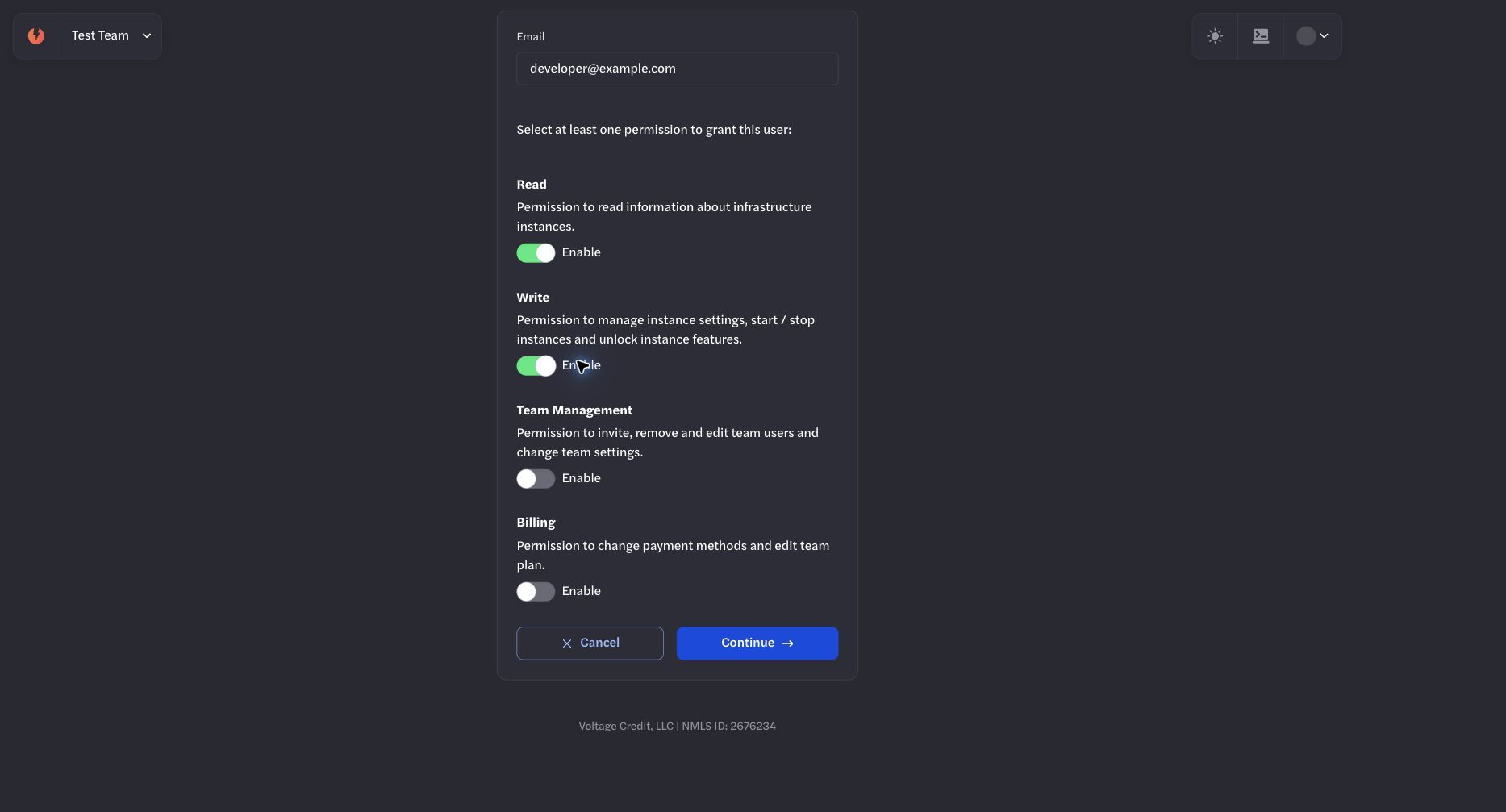
Roles are selected during invitation. Product-specific credential and permission checks still apply.