Checkout (Beta)
Beta: Voltage Checkout is currently in beta. Availability, supported payment methods, configuration, and interfaces may change. Confirm that the current beta fits your implementation before launching it in production.
Voltage Checkout gives merchants a hosted Lightning payment page without requiring them to build and operate the payment interface themselves.
See the Demo
If you want to see a demo of what to expect from the checkout, you can view a live example here.
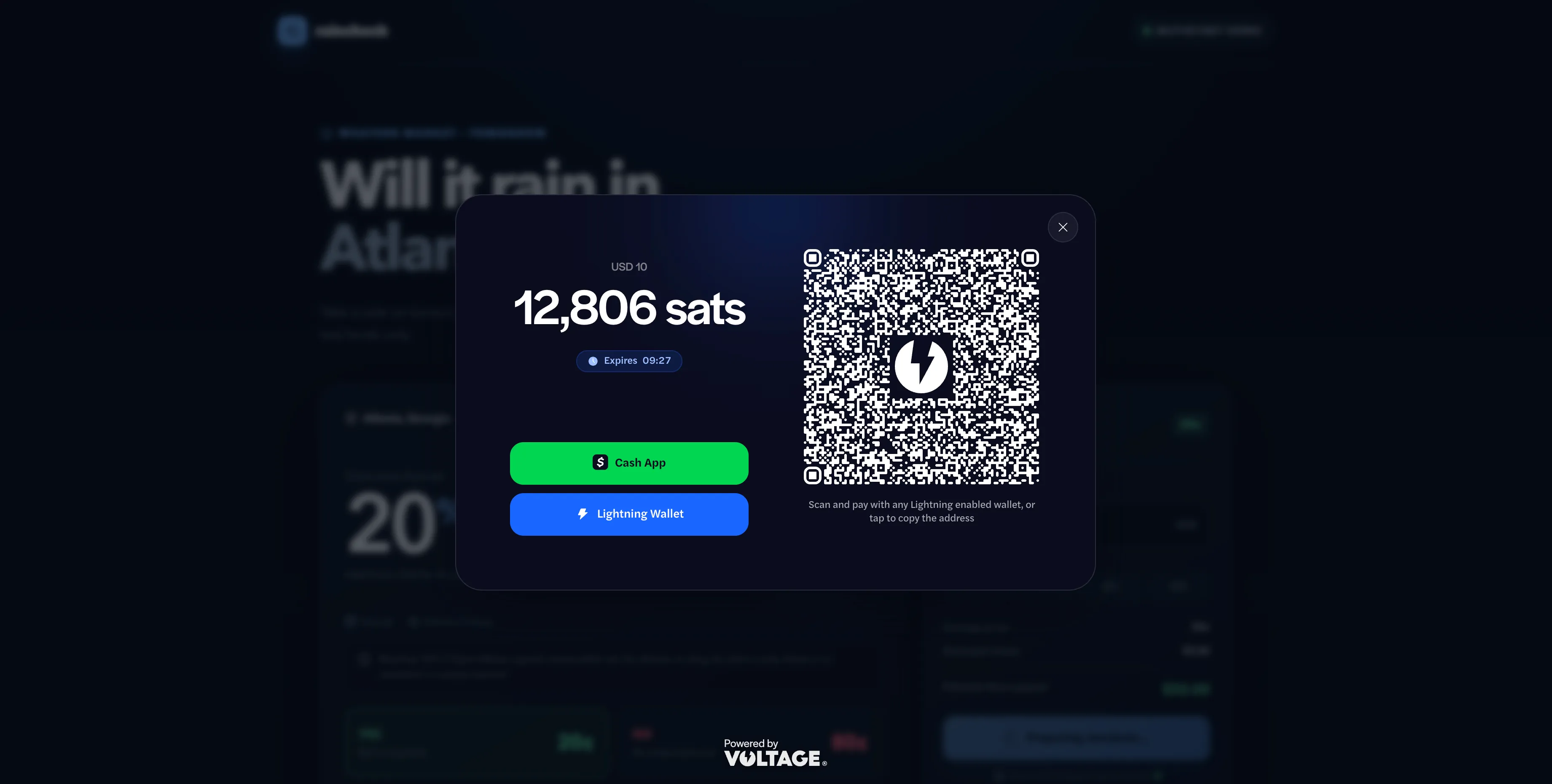
How Checkout works
- Your server creates a checkout session for an order.
- Voltage returns a hosted checkout_url, checkout session ID, and payment ID.
- Your browser opens the returned URL, preferably with the Voltage Checkout JavaScript SDK.
- The customer pays the Lightning invoice.
- The hosted page reports status to the browser.
- Your server verifies the payment before fulfilling the order.
The browser experience helps the customer complete payment, but it is not the authoritative payment record. A customer can close a tab, lose network access, or modify browser code, so always verify payment from your server.
Before you integrate
Make sure you have a Voltage wallet that you can use (Mutinynet for testing, or mainnet for real money). You can learn more about those topics in the Wallet Setup GuideWallet Setup Guide or Wallet ManagementWallet Management article.
Configure browser origins
First, decide which browser origins you want to allow when using the Checkout in an iframe or SDK overlay. For example, you could declare that you only want the Checkout to be shown on shop.example.com, as well as staging.shop.example.com for testing and localhost:5173 for local development. You can also allow your Checkout to appear on any domain name, though this is not recommended. If you choose "Deny", then you are effectively disabling Checkout for a given environment,
To configure browser origins:
- Sign in to Voltage.
- Open the organization and environment.
- Select Manage Environment.
- Find Checkout.
- Select an origin policy.
- If you use an allowlist, enter one exact origin per line.
- Save the origins.
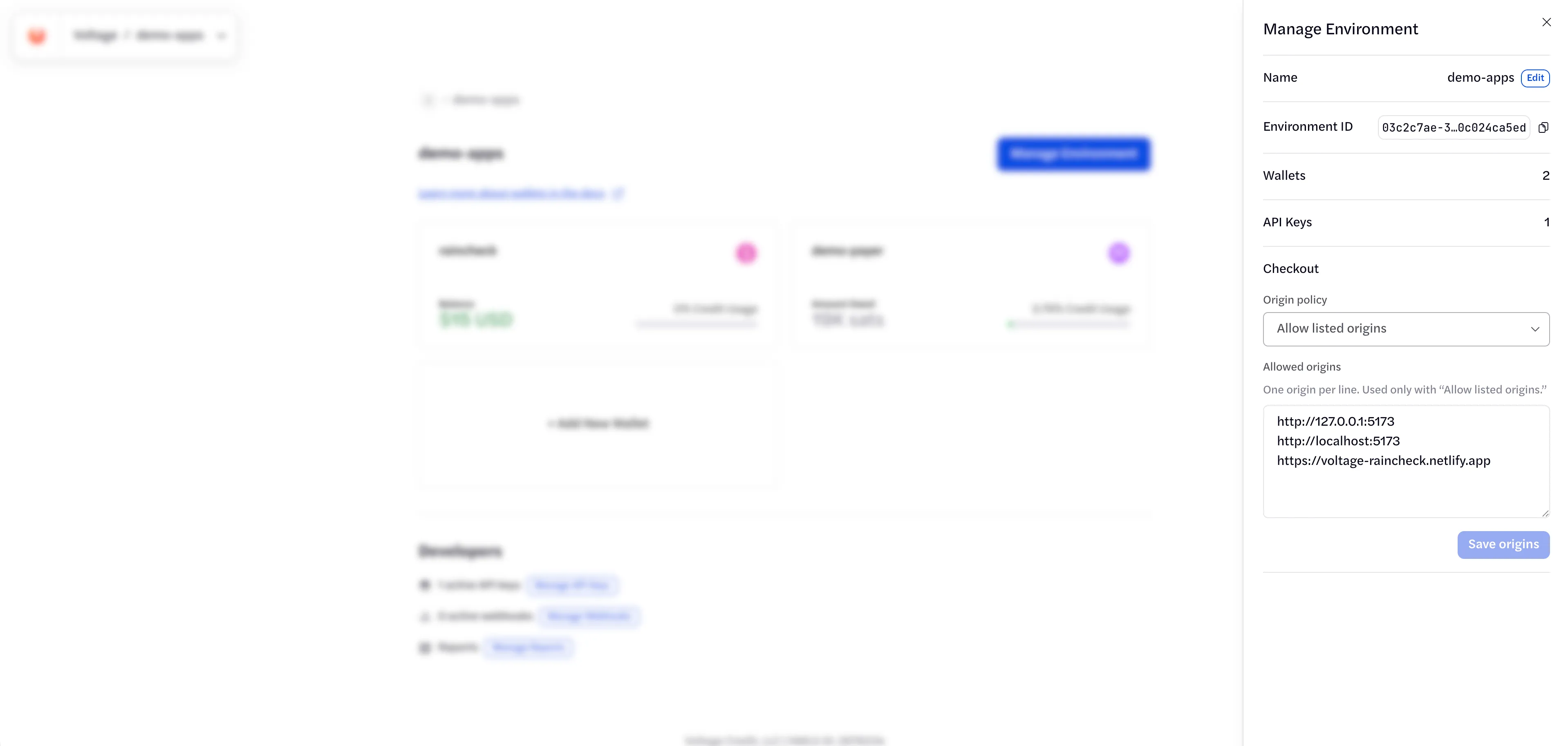
Formatting the origin
An origin contains a scheme, hostname, and optional port. It does not contain a path, query, user information, or fragment.
Valid origins:
Invalid origins:
Policy | Behavior | Recommended use |
|---|---|---|
deny_all | Prevents browser embedding. | Disable browser checkout access. |
allowlist | Permits only exact entries in allowed_origins. | Live use and normal testing. |
allow_all | Permits any browser origin. | Short-lived troubleshooting only. |
localhost and 127.0.0.1 are different origins. Netlify, Vercel, and similar deploy previews also have origins that differ from the primary site. Add each origin intentionally, and review the list before launch. Browser-origin settings are specific to each environment. When switching environments, re-add your application’s exact origin in the new environment—for example, https://voltage-raincheck.netlify.app. This is separate from the API key’s IP allowlist.
Create a checkout session
A checkout session should be created from your server. Never call the Voltage session endpoint directly from browser code, as this could expose your API key.
Send the environment API key in the x-api-key header.
Example
The following Node.js example creates a 10,000-satoshi BTC BOLT11 checkout with a 15-minute lifetime. The amount is sent as 10,000,000 millisatoshis (msats).
Use the API base, organization, environment, wallet, and API-key values for the environment you intend to charge. During development, those values should point to an environment containing a Mutinynet wallet. Switch them to your live environment and mainnet wallet when you are ready to accept live payments.
Amount encoding
Send integer amounts in the unit expected for the currency:
Customer amount | Request value |
|---|---|
1 satoshi | {"currency": "btc", "amount": 1000} |
1,000 satoshis | {"currency": "btc", "amount": 1000000} |
10,000 satoshis | {"currency": "btc", "amount": 10000000} |
BTC uses millisatoshis: 1 satoshi = 1,000 msats. Send the integer msat amount in amount.amount; do not send decimal BTC values.
Core request fields
Field | Requirement | Description |
|---|---|---|
id | Required | Merchant-generated UUID and checkout-session idempotency key. |
wallet_id | Required | Wallet that receives the payment. |
payment_kind | Required | Use bolt11 for the verified beta flow. |
amount | Required for fixed checkout | Currency and integer amount. |
expires_at | Required | Future ISO 8601 timestamp. Fifteen minutes is a practical default. |
payment_id | Optional | Merchant-generated payment UUID. Voltage generates one when omitted. |
description | Optional | Payment description associated with the session. |
metadata | Optional | Merchant references such as an order ID. |
The session id is the idempotency key. Reusing it with the same immutable inputs replays the request safely. Reusing it with different immutable inputs returns 409 Conflict.
Successful response
A successful request returns 201 Created:
Use checkout_url exactly as returned. The URL fragment contains a bearer credential. Do not log it, send it to analytics or error tracking, include it in screenshots, or move it into a query parameter.
Open Checkout with the JavaScript SDK
Load the Checkout SDK:
Your browser should call your own server endpoint, receive the complete checkout URL, and pass it to the SDK:
The SDK creates and sizes the iframe, validates message origins, locks page scrolling, restores focus, and removes the overlay when closed. Do not build a direct iframe integration unless the SDK cannot meet a verified requirement and the integration receives a separate security review.
SDK options
Option | Description |
|---|---|
checkoutUrl | Complete checkout_url returned by Voltage. Required. |
theme | light or dark. |
dismissible | When false, hides customer dismissal controls. Merchant code can still call close(). |
title | Accessible iframe title. Describe the payment task. |
amountDisplay.primary | amount, requested_amount, or custom display text. |
amountDisplay.secondary | auto, hidden, or custom display text. |
amountDisplay.bitcoinUnit | auto, btc, or sats. |
amountDisplay.locale | BCP 47 locale such as en-US. |
amountDisplay.currencyDisplay | symbol or code. |
onComplete | Checkout reported a completed payment. Verify it on your server. |
onExpired | Session expired before completion. |
onFailed | Checkout reported a failed payment. |
onCancel | Checkout reported an explicit cancellation event. |
onMessage | Receives every accepted Voltage checkout message. |
onClose | Runs after the SDK removes the overlay. |
open() returns an object with:
- close() — removes the overlay programmatically.
- iframe — the iframe element created by the SDK.
Terminal callbacks do not automatically remove the overlay. This lets the hosted page display its completed, failed, or expired state. Call close() when your merchant experience should continue elsewhere.
An ordinary customer dismissal runs onClose; it does not imply payment failure or cancellation. Before creating another payment, check the original order on your server.
Example completion payload
Terminal callback payloads can include the session and amount details:
Use session_id to update the customer interface, then verify the corresponding payment from trusted server code.
Hosted redirect
Use a hosted redirect only when the SDK overlay cannot meet your requirements:
Validate navigation, return, order-status, and recovery behavior before launch. A redirect or browser callback must not be your only confirmation that an order was paid.
Verify payment on your server
Store the checkout session ID and payment ID with your merchant order. Before fulfillment, either process a trusted Voltage webhook or retrieve the payment from the Payments API:
Authenticate from your server. Fulfill only after the authoritative payment state is complete, and make fulfillment idempotent so retries or duplicate webhook delivery cannot produce a second order.
See Webhooks and the Voltage Payments API for the complete verification contract.
Payment lifecycle
Status | Meaning |
|---|---|
generating | Voltage is creating the payment request. |
receiving | The request is ready and Voltage is waiting for payment. |
completed | Voltage completed the receive payment. |
failed | Voltage could not complete the payment. |
expired | The session reached expires_at before completion. |
Browser dismissal is not a payment status. A customer may close or refresh the page while payment is still in flight.
Give customers a merchant-controlled order-status page. If a session is interrupted, verify the existing payment before creating another checkout. If you retry session creation after an uncertain network response, reuse the original session ID and immutable inputs first.
Security checklist
- Keep the environment API key on your server.
- Never use a VITE_, NEXT_PUBLIC_, or similar public prefix for the API key.
- Create checkout sessions through a merchant-controlled server endpoint.
- Use the complete returned checkout URL without reconstructing it.
- Treat the checkout token and checkout URL as bearer credentials.
- Redact tokens and URLs from logs, analytics, screenshots, and support tickets.
- Use an exact origin allowlist for every live browser origin.
- Treat browser callbacks as UI signals only.
- Verify payment on the server before fulfillment.
- Make order fulfillment idempotent.
Troubleshooting
Symptom | Likely cause | What to check |
|---|---|---|
401 Unauthorized creating a session | Missing or invalid API key. | x-api-key, API environment, and secret loading. |
403 Forbidden creating a session | API key lacks access. | Organization, environment, and key permissions. |
409 Conflict creating a session | Session ID reused with different inputs. | Replay the original request or generate a new UUID. |
Browser says the checkout refused to connect | Origin blocked by checkout framing policy. | Exact scheme, hostname, port, and environment settings. |
Checkout says its token is missing | URL fragment was removed. | Pass the complete returned checkout_url unchanged. |
SDK does not load | Wrong script URL, CSP, network, or script failure. | SDK URL and browser console. |
Checkout remains in generating | Payment creation or status updates are delayed. | Payment and session records in Voltage. |
Checkout completes but merchant UI does not update | Callback or origin-message problem. | Parent origin, SDK version, callback handlers, and console. |
Checkout returns a plain-text 5xx | Hosted checkout or upstream service is unavailable. | Record the time and IDs, avoid logging the token, and contact support. |
Related guides
- Wallet Setup GuideWallet Setup Guide
- Staging EnvironmentStaging Environment
- Payments AccessPayments Access
- ReceivingReceiving
- WebhooksWebhooks
- Voltage Payments APIVoltage Payments API